What is CNC plasma table and how does it work?
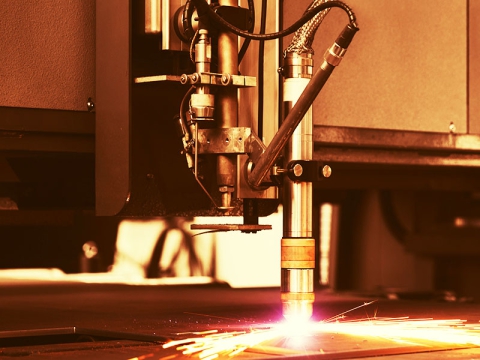
CNC plasma table is a CNC metal cutting system that uses electric energy to heat the plasma cutting gas to a plasma state, so that the cutting gas forms a beam of plasma arc. When the plasma arc scans the surface of the processed material, it will heat, melt or vaporize the material in a very short time, and at the same time use high-pressure gas to blow away the melted or vaporized material from the kerf to form holes. As the plasma arc moves linearly relative to the material, the holes are continuously formed into narrow slits to achieve the purpose of cutting the material. Since the cutting edge is less affected by heat, the deformation of the workpiece is small. During the cutting process, it is also necessary to add an auxiliary gas suitable for the material to be cut to protect the molten metal from exothermic chemical reactions and to help blow away the slag in the cutting seam.
A CNC plasma cutting machine consists of six parts: plasma power supply, numerical control system (CNC), machine tool, drive system, cutting torch assembly and accessories.
How to use a CNC plasma cutting table for beginners?
Preparations Before Operation
1. After connecting the equipment (Bota heavy industry please pay special attention to the safety grounding wire must be connected), check carefully, if everything is normal, you can proceed to the next step.
2. Close the power supply switch to supply power to the host. Note: The input AC current is about 65A, it should not be too small, otherwise the host will not work normally. At the same time, check that the fan inside the host machine should meet the regulations, otherwise, adjust the phase of the input power supply until the direction of rotation matches.
3. Put the host "power switch" in the "on" position. At this time, the "power indicator" light is on. However, the "Lack of Phase Indication" light should not be on, otherwise, there is a phase loss in the three-phase power supply, which should be checked and resolved. Note: If the main body shell is not properly connected to the safety ground wire, the phase loss indicator may display wrong results.
Operating Procedures
Step 1. Turn on the switch that controls the numerical control in the power distribution cabinet of the workshop, turn on the main power supply of the cutting electromechanical cabinet, turn on the power supply of the dust removal controller, and start the dust collector.
Step 2. After the CNC system is fully started, turn the emergency stop switch to the right, and turn the power button to the right to power on the drive.
Step 3. Customize each axis to return to zero.
Step 4. Check the plasma wearing parts and replace them, and close the plasma power circuit breaker.
Step 5. Turn on oxygen and compressed air, each gas pressure is 8.3bar+/-10%.
Step 6. Call the cutting program.
Step 7. Call the corresponding database of the program.
Step 8. Correction.
Step 9. Save the program cutting start point to the reference point.
Step 10. Turn on the plasma power and adjust the gas settings.
Step 11. Start cutting.
Step 12. If you encounter problems in the middle, please press the stop button to stop cutting, and continue cutting after troubleshooting.
Step 13. After cutting, turn off the computer power, plasma power, and gas valves of the machine.
Step 14. Clean the machine, including the frame, rails, and refuel.
Precautions
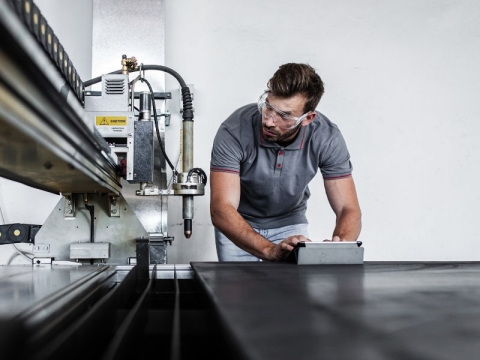
1. Operators must wear protective masks, welding gloves, hats, filter dust masks and soundproof earmuffs. Personnel without protective glasses are strictly prohibited from directly observing the plasma arc, and bare skin is strictly prohibited from approaching the plasma arc.
2. When cutting, the operator should stand in the upwind place to operate. The air can be drawn from the lower part of the workbench, and the open area on the workbench should be reduced.
3. When cutting, when the no-load voltage is too high, check the electrical grounding, zero connection and insulation of the torch handle, insulate the workbench from the ground, or install a no-load circuit breaker in the electrical control system.
4. The high-frequency generator should be equipped with a shielding shield, and the high-frequency circuit should be cut off immediately after the arc is struck with high frequency.
5. The cutting operation and cooperating personnel must wear labor protection articles as required, and must take safety measures to prevent accidents such as electric shock, falling from high altitude, gas poisoning and fire.
6. The cutting machine used on site should be equipped with rain-proof, moisture-proof and sun-proof machine sheds, and corresponding fire-fighting equipment should be installed.
7. When welding or cutting at high altitude, the safety belt must be fastened. Fire prevention measures should be taken around and below the welding and cutting, and special personnel should be supervised.