

These days, a wide range of industries depend on plasma-cutting technology. It cuts through many types of metal quickly and precisely. Using a high-velocity plasma stream of ionized gas, the most recent technique melts the metal to produce clean, accurate cuts. Plasma cutting tables automate this cutting process, allowing operators to provide precise results with less human work. These tools are widely used in manufacturing, construction, and the car industry, among other sectors where efficiency and accuracy are vital.
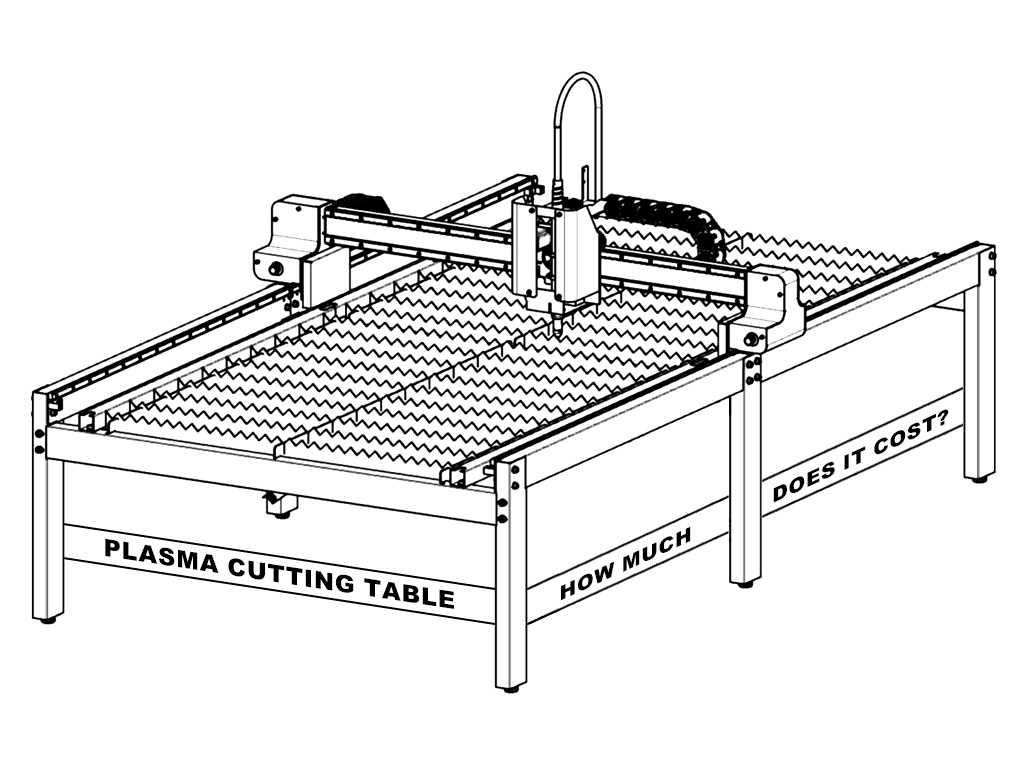
It is important for anyone considering buying one of these equipment to be aware of the costs associated with plasma cutting tables. Size, power, and technology are some key elements that influence cost. This post will discuss the standard price ranges for several types of plasma cutting tables, the factors influencing these costs, and the variety of options available. After reviewing this article, readers will have a better understanding of what to anticipate when planning a budget for a plasma cutting table.
What is the Cost of Owning a Plasma Cutting Table?
While choosing a plasma cutting table, price is a crucial consideration. A few factors that could result in a wide range of prices are size, power, and features. To help you make an informed purchase, we'll examine the various price ranges and the variables that affect them in this section.
Entry-Level Plasma Cutting Tables
Entry-level plasma cutting tables typically cost between $2,000 and $5,000. These tables are appropriate for minor projects and light-duty activities. They frequently have manual controls and simple functionality.
Mid-Range Plasma Cutting Tables
The usual price range for mid-range plasma cutting tables is $5,000 to $15,000. These devices have more features and perform better. For companies who need to cut heavier metal and a greater range of materials, they are perfect. For more accuracy, mid-range models frequently have CNC capability.
High-End Plasma Cutting Tables
The price range for high-end plasma cutting tables is from $15,000 to over $100,000. These devices are built for heavy workloads and industrial applications. They have more sophisticated features like bigger work surfaces, faster cutting rates, and automated controls. The improved quality and technology utilized in its construction are reflected in the higher cost.
Additional Features That Affect Cost
High-definition cutting, integrated software, and sophisticated cooling systems are examples of extra features that can affect cost. Although these characteristics can improve effectiveness and performance, they may raise the table's total cost. When choosing the best plasma cutting table for their unique requirements, customers can make more educated judgments if they are aware of these price points and characteristics. It guarantees they receive the highest return on their investment.
Types of Plasma Cutting Tables Available in the Market
When choosing a plasma cutting table, understanding the different types available is essential. Each type is designed for specific applications and needs. Knowing these differences helps you select the right table for your projects and ensures optimal performance.
Manual Plasma Cutting Tables
The cutting torch on these tables must be manually controlled by the operator. Although they are typically less expensive, using them successfully takes more experience and ability. Smaller jobs and basic cuts are appropriate for manual tables. However, depending on the operator's expertise, the precision may vary and the learning curve may be steep.
CNC Plasma Cutting Tables
The cutting operation is automated by Computer Numerical Control (CNC) tables. They can create intricate designs and precise cuts because they use a computer to regulate the torch's movement. Due to their superior technology, CNC tables are usually more expensive. Their large volume production capabilities and ability to maintain consistency across many sections make them a popular choice in industrial environments.
Portable Plasma Cutting Tables
These are smaller and designed for easy transportation. They are ideal for fieldwork and smaller projects. While they are often less expensive, they may not offer the same cutting power as larger models. Portable tables are excellent for contractors who need flexibility on job sites and can handle various metal thicknesses within their limits.
High-Definition Plasma Cutting Tables
The greatest level of precision is offered by these advanced tables. They have characteristics that enable complex cuts on a variety of materials. But they are more expensive; they frequently cost more than $30,000. For businesses like aerospace and automobile manufacturing, where even small errors can have serious consequences, high-definition plasma tables are ideal.
Popular Plasma Cutting Table in the Market
Small Entry-Level 4x4 CNC Plasma Table
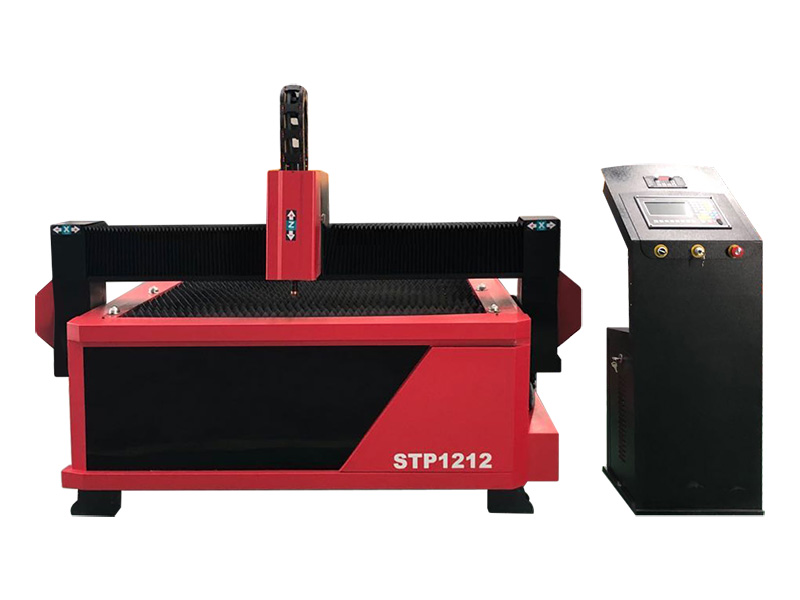
The STP1212 from STYLECNC is an entry-level CNC plasma table with a 4x4 working area, which is designed for hobbyists seeking precision cutting capabilities in metal fabrication. The 4x4 plasma cutting table comes with a rugged construction to ensure durability and stability during operation, while the user-friendly software makes it easy for beginners to use. Overall, this small plasma cutting table is considered a great and affordable investment for DIYers and artists, whether they are looking to improve their metalworking capabilities or increase their creativity and productivity in metal fabrication.
Top Rated Professional 4x8 CNC Plasma Cutting Table
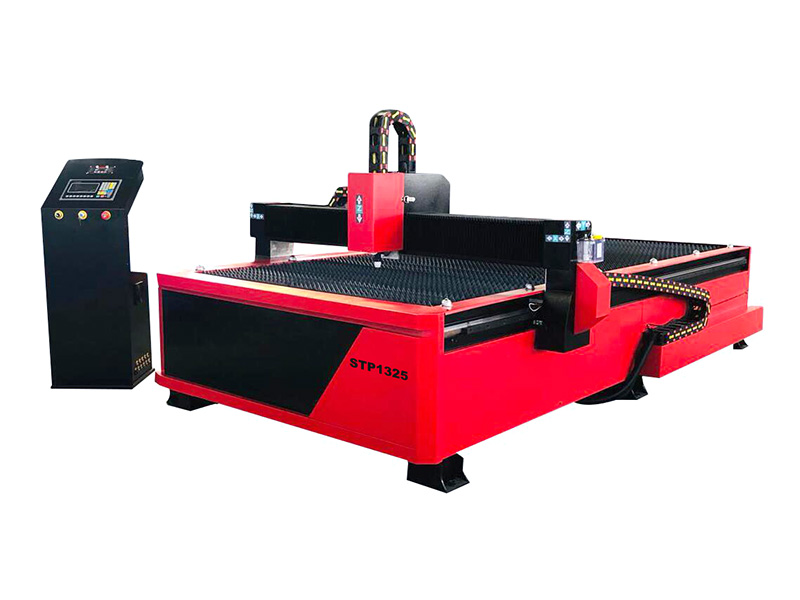
The best 4x8 CNC plasma cutting table of 2024 from STYLECNC is designed for professionals working on precise sheet metal cutting with a 48" x 96" bed size. It supports various power options, including Hypertherm and Huayuan, with cutting capacities up to 40mm. The machine features a Starfire control system, automatic torch height control (THC), and FastCAM software for material-saving nesting.
Its sawtooth or blade table design ensures stability, while optional rotary devices allow for metal tube cutting. The table offers high precision, versatility, and efficiency, making it ideal for industries such as fabrication, automotive, marine, and signage. Regular maintenance and proper calibration ensure long-term performance and productivity.
Industrial 5x10 Hypertherm Plasma Cutter Table
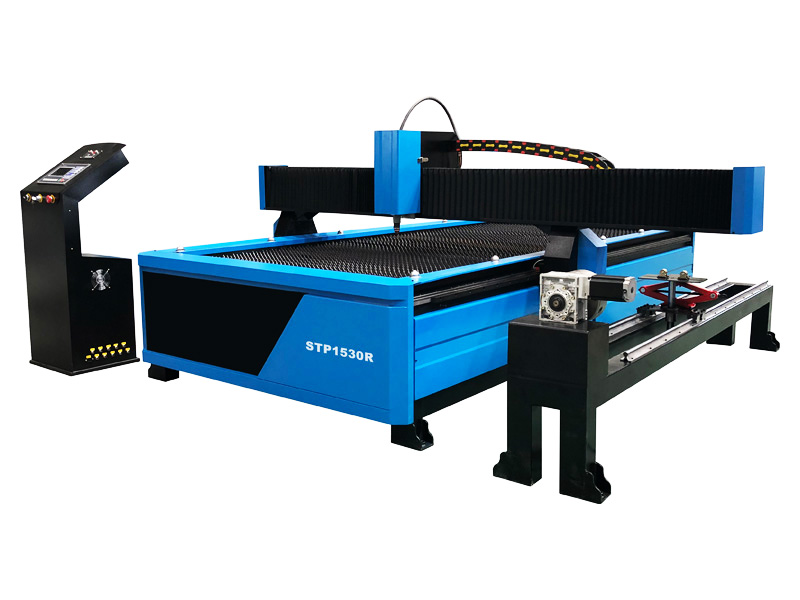
The 5x10 Hypertherm plasma cutter table from STYLECNC is a high-performance machine designed for precise and efficient metal cutting in industrial manufacturing. It features a 1500x3000mm cutting table and supports rotary cutting of pipes with diameters from 200mm to 600mm. Powered by options like Hypertherm Powermax (45A to 200A) or Huayuan, it can handle materials up to 40mm thick. The machine integrates a Starfire CNC control system, HYD torch height controller, and dual-motor Y-axis drive with Taiwan Hiwin linear rails for smooth and precise operation.
The advanced features of STYLECNC's plasma cutting table include lubrication systems, auto-fume extraction, and flexible configurations for both sheets and tubes. Its high speed, robustness, and reliable performance make it perfect for use in industries such as aerospace, manufacturing, and shipbuilding. To improve operator safety, safety features like emergency stops, voltage monitoring, and thermal overload protection are included. It provides thick metal manufacturing at a lower cost with optimal energy consumption when compared to fiber laser cutters.
Factors That Influence the Cost of Plasma Cutting Tables
Several factors can affect the cost of a plasma cutting table. Understanding these can help buyers find the right machine for their needs.
• Size of the Table: Larger tables can accommodate bigger sheets of metal. They generally cost more due to their size and increased capabilities.
• Power Requirements: Plasma cutters come in various power ratings, which affect cutting speed and thickness. Higher power machines are more expensive but offer greater cutting capabilities.
• Brand Reputation: Established brands often charge more for their machines. However, they typically provide better quality and reliability, making them a worthwhile investment.
• Additional Features: Features like CNC automation, advanced software, and improved cooling systems can increase the price. Buyers should assess which features are essential for their work.
Additional Costs to Consider
In addition to the initial purchase price, there are other costs to consider when buying a plasma cutting table. Understanding these expenses can help you plan your budget effectively.
Software
Many machines require specialized software for operation. This can range from $500 to $5,000, depending on the capabilities. The right software can significantly enhance the cutting process, enabling more complex designs and better precision. Investing in high-quality software ensures you get the most out of your plasma cutter.
Maintenance
Sufficient performance requires routine maintenance. This involves changing out wearable components like electrodes and nozzles, which raises continuous expenses. Maintaining your machine not only makes it last longer but also makes sure it runs well. Ignoring maintenance can cost you money in repairs and cause downtime, which lowers production.
Consumables
Plasma cutting requires consumable materials that need regular replacement. Budgeting for these can help avoid unexpected expenses. Consumables can include electrodes, nozzles, and plasma gas, all of which are necessary for effective cutting. Keeping a close eye on your inventory of consumables ensures you won't face interruptions during critical projects.
Accessories
The price of the item may also increase with additional accessories like toolboxes, clamps, and safety equipment. You should account for these in your budget. To shield personnel from potential risks during the cutting process, safety equipment is essential. Good clamps and toolboxes can improve productivity and coordination, which will improve workspace efficiency overall.
Is Buying a Used Plasma Cutting Table a Good Option?
Buying a used plasma cutting table can be an appealing option for many businesses. It offers a chance to save money while still acquiring a valuable piece of equipment. However, it is important to weigh the advantages and disadvantages before making a decision.
Pros of Buying a Used Plasma Cutting Table
• Cost Savings: Used machines are typically cheaper than new ones, allowing buyers to access higher-quality models without breaking the bank.
• Less Depreciation: Purchasing a used machine often means experiencing less depreciation, helping you maintain more of your investment over time.
• Opportunity for Upgrades: With the savings, you may afford a more advanced model or additional accessories, enhancing your overall capabilities.
Cons of Buying a Used Plasma Cutting Table
• Wear and Tear: Used machines may show signs of wear, which can impact performance and cutting precision, leading to unexpected maintenance costs.
• Outdated Technology: Older models may lack the latest features and capabilities, hindering productivity in a fast-paced industry.
• Limited Warranty: Used machines often come with limited or no warranties, increasing the risk if something goes wrong shortly after purchase.
Before buying a used plasma cutting table, it is crucial to conduct a thorough inspection. Understanding the machine's history, previous usage, and maintenance records can help you make an informed decision. By weighing these pros and cons, you can determine if a used plasma cutting table is the right option for your needs.
Final Words
It's important to carefully examine your goals and budget while selecting the best plasma-cutting table. Determine the kinds of materials you plan to cut and the amount of work you anticipate before beginning. Entry-level variants of plasma cutting tables typically cost $2,000, while high-end industrial units can cost over $100,000. It's critical to assess your budget and account for any supplemental expenses for consumables, maintenance, and software.
Investing in a well-chosen plasma cutting table can significantly boost productivity and efficiency. By taking into account the costs and features, together with any potential savings from buying used equipment, you can make an informed choice. Knowing what types are available and what their price ranges are will help you choose a table that meets your needs without going over your budget. Your cutting operations will operate profitably and efficiently over the long term if you make wise investments.
STYLECNC provides free consultation, business solutions, quotations, and sales services for machines and accessories for sale, and provides technical support for transportation, distribution, installation, commissioning, operation, and repair of sold machines, and provides lifetime installation , debugging and maintenance services for software.
Pre-Sales Service
1. Free Sample Cutting Service: For free sample cutting/testing, please send us your CAD file (PLT, AI), we will do cutting in our factory and make video to show you the cutting process and result, or send samples to you to check the cutting quality.
2. Progressing Solution Design: According to customer's product processing requirement, we can design the unique solution that supports higher manufacturing efficiency and better processing quality for customer.
3. Customized Machine Design: According to customer's application, we may revise our CNC machine according to customer's convenience and high production efficiency.
After-Sales Service and Technical Support
1. As a professional CNC machine manufacturer and supplier, STYLECNC will supply the CNC machine with training video and user's manual in English for installing, operation, maintenance and trouble-shooting, and shall give technical guide by remote, such as TeamViewer, E-mail, Telephone, Mobile, Whatsapp, Skype, 24/7 online chat, and so on, when you meet some problems of installation, operation or adjusting.
2. You can come to our CNC machine factory for training. We will offer professional guidance, direct and effective face-to-face training. Here we have assembled equipment, all sorts of tools and testing facility. Training Time: 3~5 days.
3. Our engineer will do a door-to-door instruction training service at your local site. We need your help to deal with the visa formality, prepaid traveling expenses and accommodation to us during the business trip and service period before their dispatch.
STYLECNC values your business and always attempts to provide you the best service and support.
No limited warranty is provided by STYLECNC unless your CNC machine was purchased from STYLECNC or an authorized distributor as well as an authorized reseller. Please see below for the warranty information.
As a top CNC machine brand & manufacturer in the world, STYLECNC promise:
1. 1-3 years for the whole CNC machine.
2. Long life-time maintenance, after-sale department will offer 24/7 English online support.
3. Except the damage artificially, we are responsible for offering the fittings free of charge during warranty.
4. After the warranty period expired, you only need to pay the actual maintenance cost.
5. Certificate support: CE, FDA, SGS.
1. Focus lens for contamination: Clean focusing mirror.
2. Focus relief laser engraving machine equipment whether changes: Re-adjust the focus.
3. Light path is offset: Carefully adjustment of the optical path.
4. Reflective lens is contaminated or damaged: Clean or replace the reflective lenses.
5. Laser power is energized: Checking laser power supply circuit so that it is normal.
6. Laser tube is damaged or aging: Replace the laser tube.
7. Laser power supply is damaged: Replace the laser power.
8. Cooling water is circulating flow: Clear cool water.
9. The cooling water temperature is normal or not: Replace the clean cooling water to the temperature to normal.
What I tell you about the laser weaker of laser engraving machine? we have to know how the above problems to be fixed, and welcome to our online support with laser engraving machine.
We can offer customers accessories for CNC router machines and CNC milling machines, including cutting tools (such as mills, drills, bits, and tools), tool holders, ER collets, dust collectors, as well as upgrading components such as rotary tables or automatic tool changers. We also sell accessories for CNC laser machines, such as focus lenses, rotary attachments, risers, automatic feeders, fume extractors, and water chillers. Our selection of accessories for CNC plasma cutters in stock is second to none, with everything from plasma cutting tips, torches, and nozzles to drag shields, electrodes, and air filters. Accessories for CNC wood turning lathe machines are also available for purchase online at STYLECNC, including drive centers, revolving centers, blades, chisels, tool rests, faceplates, and safety equipment such as face shields and dust masks. Additionally, you can find and buy some software for CNC programming and simulation at STYLECNC.
1. CNC router spindle rotation sound is not normal
a. The drive is set incorrectly.
b. Check whether the cooling water circulation.
c. There are problems with the spindle (bearing damage).
d. If the noise when loaded knife, normal, replace the tool without tooling.
2. CNC router spindle hot or noisy:
a. Check whether the cooling water circulation.
b. Check whether the bearing problem.
c. If loaded knife noise, without tooling normal, replace the tool.
3. CNC router spindle cooling water does not flow:
a. Check the coolant pump is working properly.
b. Check whether the water flow, the water from the spindle joint apart, blowing to the other side of the steam gun from one side or the connector on the spindle with a needle penetrating.
4. Motor reversal:
Check the motor cable is phase output UVW terminal ends of any exchange.
1. When laser engraving with gradient, double phenomenon.
This phenomenon occurs when the slope of words carved smaller, usually the reason is "wide" setting slope too large, cause calculation errors, please set "wide" little slope.
2. If you only can move a graphic with one direction, please click "Shift" or "Ctrl" to recover.
3. PLT format cannot to engrave.
There are two reasons, one is the graphic is not closed, the other is graphic double. Please detect this phenomenon with "data detect" tools.
4. The size is not same with laser engraving and cutting samples. Open the item "laser engraving machine set", adjust the pulse.
5. The edge is irregularity when laser engraving.
The edge is irregularity maybe happen when you use the DSP laser engraver software, that means "burr", this is mainly caused by mechanical return clearance, this is the solution.
a. Draw a box (rectangular or square), set work mode for the laser engraving machine, the sculpture is 0.5 mm instead, then see laser engraving effect, theoretically, should be aligned, namely the odd interlaces did edge should be aligned, even did edge also should be aligned, only the odd and even did not have a little.
b. When you open "set laser engraving parameters", the parameters for different. laser engraving speed can be seen, the reverse gap is "0", you should adjust it as the matter of fact.
c. You can choose "single-track light" when best laser engraving effect needed. Not to chose the draw of "dual-engrave", but when you chose it, the efficiency would be lower.
6. The X-axis or the Y-axis not move.
a. Stir knob to chose the DC 5V, test the voltage between PULX(or PULY)and GND. Take Y axis as example, click the button of "up" or "down", the normal voltage is 2.8V, if it is not, we could confirm the controller was broken, please change the controller. If it is, please go to next step.
b. Exchange the output terminal of the two drivers, then press "Up" or "Down" button; if X axis works normal, it means there is something wrong with the motor on Y axis, please change a new one; if X axis doesn't work, it means there is something wrong with the driver on Y axis, please chance it.
7. X Axis and Y Axis work in only one direction.
a. Test the voltage between the DIRX and GND after pressed the multimeter into grade 5V; take the X Axis for example, press "left", then press "right" to see if there is some change on high level (>2.8V) and the low level(<0.8V); if not, the control card is broken and need to change a new one.
b. If with change, please check the driver; if works normal, please change the driver on Y Axis.
8. NO Ray.
Test the voltage between the LAS and GND after pressed the multimeter into grade 5V; press "fixed fire" in the control panel, to see if there is some change on high level (>2.8V) and the low level(<0.8V); if not, the control card is broken and need to change a new one. Also set up the time of fixed fir as 0 millisecond, which is in the PAD03 menu.
Adjust the power from 0%~100%, enter and press "fixed fire" button, then test if any change between the DA1 and GND from 0V to 5V; if not, the control card is broken, please change it; if both with, it means there is something wrong with the laser power supply.
1. Roughness
Laser cutting cross section will form a vertical lines, the depth of the texture of the cut surface of the roughness of the cut surface, the more shallow lines, the more smooth cut section. Roughness not only affects the appearance of the edges, but also affect the friction characteristics, in most cases, it is necessary to minimize the roughness, so the more shallow texture, the higher the quality of the cut.
2. Verticality
If the sheet thickness exceeds 10mm, the verticality of cutting edge is very important. Away from the focus, the laser beam becomes divergent, according to the location of the focus, cutting to the top or bottom of the variable width. Cutting edge off the vertical line of a few millimeters, the edge of the more vertical, the higher the quality of cutting.
3. Cutting width
Kerf width generally does not affect the cutting quality, only in the internal components formed special precision contour, cutting width is important. This is because the cutting width determines the contour of the minimum, when the plate thickness increases, the cutting width also increases. So want to guarantee the same high precision, no matter how much the width of the cut, the workpiece in the laser cutting machine processing area should be constant.
4. Lines
High speed cutting thick plate, the molten metal will not appear in the vertical laser beam below the incision, but will be sprayed out at the laser beam side. As a result, the curved lines are formed on the cutting edge, and the lines are closely followed by the laser beam. In order to correct the problem, the feed rate can be reduced at the end of the cutting process.
5. Burr
Burr formation is a very important factor to determine the quality of laser cutting, because the removal of burr need extra work, so the amount of burr is serious and how much is able to directly determine the quality of cutting.
6. Material Deposition
Laser cutting machine before the beginning of melting and perforation of the workpiece surface with a layer of oil on the surface of a special liquid. Gasification and all kinds of materials, the material does not need to use the wind to blow the cut, but the upward or downward discharge also can form the deposition on the surface.
7. Sag and Corrosion
Sag and corrosion have adverse effects on the surface of the cutting edge, affecting the appearance. They appear in the error of the cut which is generally supposed to be avoided.
8. Heat Affected Zone
In laser cutting, the area near the notch is heated. At the same time, the structure of the metal changes. For example, some of the metals can be hardened. The heat affected zone refers to the depth of the area that is changed by the internal structure.
9. Deformation
If the cutting makes the component heat, it will deform. This is particularly important in fine processing, because the profile and connecting pieces are usually only a few millimeters wide. Control of laser power and the use of short laser pulses can reduce the parts to become hot, to avoid deformation.
1. The machine and the computer must have a good grounding.
2. Open the cutting software, click the file menu, communication settings to receive and send the buffer time is changed to 5 or 10.
3. The replacement of the data line or motherboard.
According to the same direction of the panel button, the laser cutting machine appears to be turning and reversing and motor power can not be locked.
1. First disconnect all power supply, the high pressure head with cotton cloth to wipe clean. (gentle scrub)
2. Cut off the broken pipe, re received the laser tube. And bundled with a tie.
3. The high voltage line (high pressure line with 7 silver thread, one less).
4. The fan will dry high pressure wet place, after half an hour, and then boot.
Laser engraving or laser cutting is to converge the laser beam into a small spot through a focusing mirror and project it onto the surface of an object. The focal point reaches a high power density. At this time, the irradiated part of the material is quickly heated and vaporized, and the laser beam and the material move relatively linearly, so as to realize laser engraving cutting plans.
When the laser engraving machine or laser cutting machine is working for a long time, the optical path will deviate, which will affect the cutting effect. Only the perfect cooperation of laser tube, reflecting mirror frame (A, B, C), focusing lens and corresponding adjustment device can achieve the best effect and process the best projects. This is the core part of using CO2 laser machine. Therefore, it is very necessary to check the laser beam path and adjust it regularly.
8 Steps to Adjust and Align CO2 Laser Beam Path:
1. Turn on the air pump, the air flow is discharged under the trolley, and the wires on the X and Y axis drives of the right control box are pulled away.
2. Turn on the machine switch, the LCD display on the operation panel shows "The system is starting, please wait ..." At this time, the machine is in the reset state, wait for about half a minute, then the LCD displays: File name: AAA Processing speed 100% processing Power: 100/100% Processing quantity 1 Delete. At this time, the machine is in the initial online state.
3. Stick a round cardboard larger than the lens in front of the first reflective lens and the second reflective lens.
4. Put a large cardboard in front of the laser head of the tube, press the fire button on the operation panel, the laser tube emits light, and adjust the laser to the first reflection by adjusting the front and rear positions of the laser tube bracket and the thickness of the rubber under the tube The middle of the lens.
5. Adjust the laser to the middle of the second reflective lens by adjusting the three screw shafts behind the first reflective lens. When adjusting the second reflective lens, the X-axis beam should be moved to the front and back, the point where the laser hits Be completely coincident.
6. Adjust the laser to the hole on the left side of the laser head by adjusting the three screw shafts behind the second reflective lens. When the laser head moves to the four corners of the worktable, the laser must hit the middle of the hole.
7. Focus adjustment.
Focal length refers to the distance (4-4.2mm) between the top of the cone head under the laser head and the surface of the material.
8. By adjusting the tightness of the three screws on the mirror above the laser head, the laser can be adjusted to the vertical angle to ensure the verticality of the cutting surface when cutting.
Note: If you can't find your answer in the FAQs above, please ask a new question in the form below.
Ask Your Question
Asking questions is essential in CNC machining for fostering understanding and encouraging exploration, allowing individuals to gain deeper insights and challenge assumptions, ultimately facilitating learning and innovation.